Cloning DevOps repo authentication failed error
June 13, 2024, Abdush Miah
Summary
You're ready to start your next project and you've created for yourself an Azure DevOps project as well as a new repo. In attempting to clone your new repo you see the following error:

Step 1
Navigate back to your Azure DevOps instance and navigate to your project
Step 2
Click on "Repos" and on the hand side pane click on "Clone"
Step 3
Next you will see the following screen, you will need to click on "HTTPS" -> "Generate Credentials"
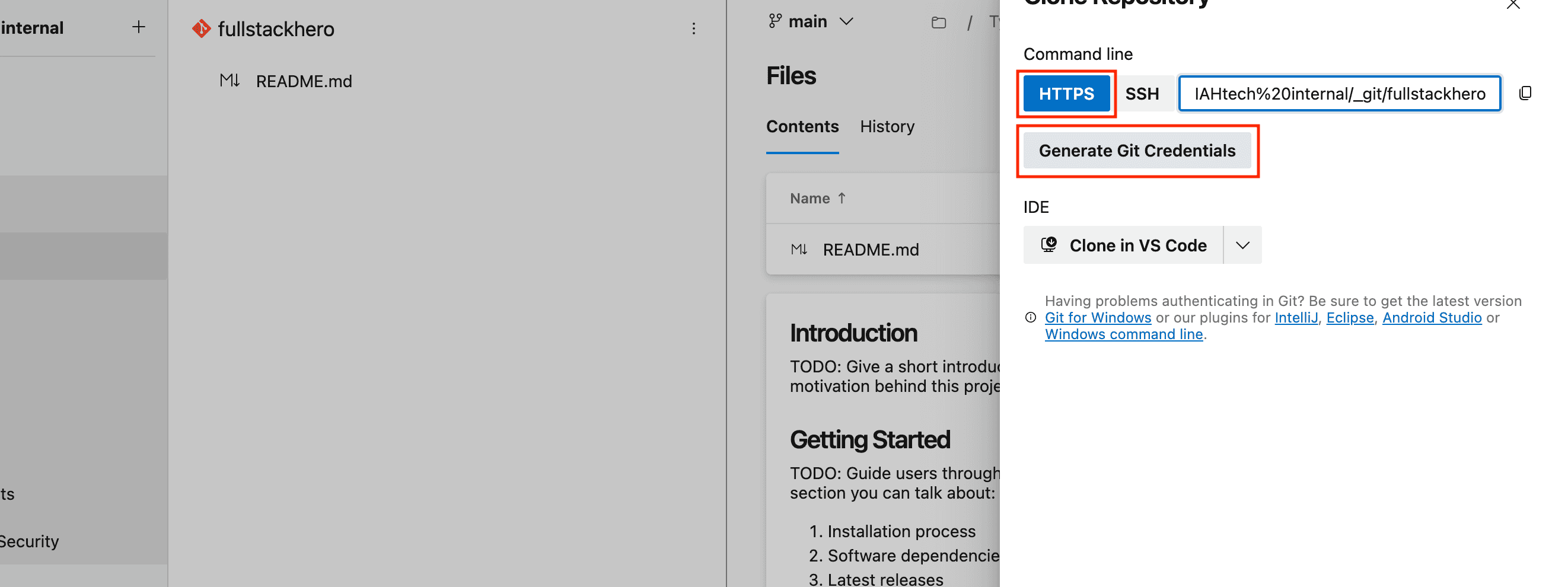
Step 4
Copy the generated password and keep it safe as well as copying the url to the repo.
Step 5
Navigate to cmd or terminal if you have a mac and navigate to your favourite destination where you like to store your projects.
Step 5
Type the following command to then clone the repository and or paste the url you copied earlier:
git clone https://{yourOrgName}@dev.azure.com/{yourOrgName}/{yourProjectName}/_git/{yourRepoName}Step 6
Enter the password you copied earlier when prompted.